
July 5, 2026
- Python
- Flask
- fastapi
- docker
- aws
- dynatrace
- observability
- articles
- projects
- Faceted Search
- Faceted Navigation
- Hierarchical Tagging
- Search Architecture
- SQLite
- Database Design
- REST API
- Aggregated Counters
- Content Management
- Next.js
1. Problem Statement
As a personal website, writing platform, documentation portal, or project portfolio grows, a simple keyword search box becomes insufficient.
Visitors may want to find:
- Articles about Python
- Projects involving FastAPI
- Case studies related to Dynatrace
- Content under a broad parent such as Technology
- Only a certain content type such as Article or Project
- Content associated with a named project such as AzQuiz
A flat tag list quickly becomes difficult to browse:
python, flask, fastapi, docker, aws, dynatrace, observability, articles, projectsA hierarchical taxonomy gives those tags structure:
Technology
├── Programming
│   ├── Python
│   │   ├── Flask
│   │   └── FastAPI
│   └── JavaScript
│       └── Next.js
├── Cloud
│   └── AWS
└── Observability
    ├── Dynatrace
    └── OpenTelemetry
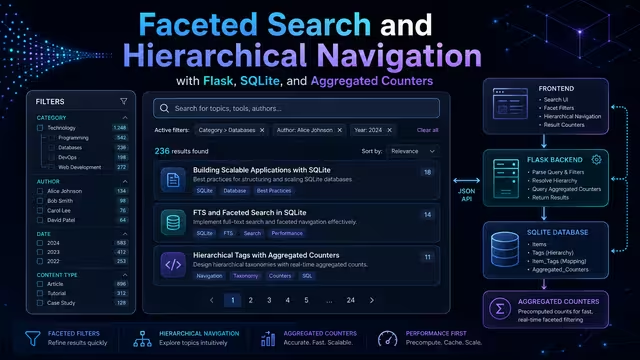
A faceted-navigation system lets visitors search and progressively filter results while showing useful result counts:
Topic
  Python (12)
  Flask (8)
  FastAPI (5)
  Dynatrace (4)

Content Type
  Article (18)
  Project (6)
  Case Study (3)
2. What the System Does
The system has four core concepts:
- Content items: articles, projects, documentation, case studies, portfolio entries, artwork, and dance pages.
- Tags: labels assigned to content items.
- Hierarchical tags: tags can have parents and descendants.
- Facet counters: counts grouped by tag or facet.
A content item can have many tags, and a tag can be connected to many content items.
content_items <--- many-to-many ---> tags
                           |
                           v
                    content_item_tags
The tag hierarchy is stored as:
tags.parent_id -> tags.id3. Facet Behavior Rules
AND between different facets
Different facets are combined with AND.
Topic = Python
Content Type = Article
Project = AzQuiz
Equivalent behavior:
Python AND Article AND AzQuizOR within the same facet
Multiple values inside the same facet are combined with OR.
Topic = Python OR CloudCombined with another facet:
(Python OR Cloud) AND ArticleParent tags include descendants
Selecting Technology includes content directly tagged as Technology and content tagged anywhere under it, such as Python, Flask, Cloud, Dynatrace, or OpenTelemetry.
SQLite recursive common table expressions are used to walk the hierarchy.
Disjunctive counters
A facet should normally calculate its counters while ignoring its own current filter.
For example, when a visitor selects:
Topic = Python
Content Type = Article
The Topic facet still shows useful choices such as Flask, FastAPI, Docker, Cloud, and Dynatrace. This is called disjunctive faceting.
4. Architecture Plan
Next.js Frontend
        |
        | GET /api/search?q=...&tag=...
        v
Flask REST API
        |
        +-- hierarchical tag expansion
        +-- keyword search
        +-- AND/OR facet filtering
        +-- aggregated facet counters
        +-- pagination
        v
SQLite for local development
        |
        v
PostgreSQL for production
Backend responsibilities
- Search queries
- Tag filtering
- Parent/child tag expansion
- Aggregated counters
- Pagination
- Content metadata
- Future admin tag management
Frontend responsibilities
- Search input
- Expandable facet sidebar
- Selected filter chips
- Result cards
- Pagination
- URL query-string state
5. Project Structure
faceted-search-demo/
├── app.py
├── schema.sql
├── seed.sql
├── requirements.txt
├── instance/
└── static/
    └── index.html
6. Requirements
Create requirements.txt:
Flask>=3.1,<4.0Install:
python3 -m venv .venv
source .venv/bin/activate
pip install -r requirements.txt
7. SQLite Schema
Create schema.sql:
PRAGMA foreign_keys = ON;

CREATE TABLE IF NOT EXISTS content_items (
    id INTEGER PRIMARY KEY AUTOINCREMENT,
    title TEXT NOT NULL,
    slug TEXT NOT NULL UNIQUE,
    summary TEXT NOT NULL,
    body TEXT NOT NULL,
    content_type TEXT NOT NULL,
    published INTEGER NOT NULL DEFAULT 1,
    created_at TEXT NOT NULL DEFAULT CURRENT_TIMESTAMP
);

CREATE TABLE IF NOT EXISTS tags (
    id INTEGER PRIMARY KEY AUTOINCREMENT,
    facet TEXT NOT NULL,
    name TEXT NOT NULL,
    slug TEXT NOT NULL UNIQUE,
    parent_id INTEGER NULL,
    sort_order INTEGER NOT NULL DEFAULT 0,

    FOREIGN KEY (parent_id) REFERENCES tags(id) ON DELETE SET NULL
);

CREATE TABLE IF NOT EXISTS content_item_tags (
    content_item_id INTEGER NOT NULL,
    tag_id INTEGER NOT NULL,
    PRIMARY KEY (content_item_id, tag_id),

    FOREIGN KEY (content_item_id)
        REFERENCES content_items(id)
        ON DELETE CASCADE,

    FOREIGN KEY (tag_id)
        REFERENCES tags(id)
        ON DELETE CASCADE
);

CREATE INDEX IF NOT EXISTS idx_tags_facet ON tags(facet);
CREATE INDEX IF NOT EXISTS idx_tags_parent_id ON tags(parent_id);
CREATE INDEX IF NOT EXISTS idx_content_item_tags_tag_id ON content_item_tags(tag_id);
CREATE INDEX IF NOT EXISTS idx_content_item_tags_content_item_id ON content_item_tags(content_item_id);
CREATE INDEX IF NOT EXISTS idx_content_items_content_type ON content_items(content_type);
CREATE INDEX IF NOT EXISTS idx_content_items_published ON content_items(published);
8. Sample SQLite Data
Create seed.sql:
PRAGMA foreign_keys = ON;

-- =========================================================
-- TOPIC FACET
-- =========================================================
INSERT OR IGNORE INTO tags (facet, name, slug, parent_id, sort_order)
VALUES ('topic', 'Technology', 'technology', NULL, 1);

INSERT OR IGNORE INTO tags (facet, name, slug, parent_id, sort_order)
VALUES ('topic', 'Programming', 'programming',
        (SELECT id FROM tags WHERE slug = 'technology'), 1);

INSERT OR IGNORE INTO tags (facet, name, slug, parent_id, sort_order)
VALUES ('topic', 'Python', 'python',
        (SELECT id FROM tags WHERE slug = 'programming'), 1);

INSERT OR IGNORE INTO tags (facet, name, slug, parent_id, sort_order)
VALUES ('topic', 'Flask', 'flask',
        (SELECT id FROM tags WHERE slug = 'python'), 1);

INSERT OR IGNORE INTO tags (facet, name, slug, parent_id, sort_order)
VALUES ('topic', 'FastAPI', 'fastapi',
        (SELECT id FROM tags WHERE slug = 'python'), 2);

INSERT OR IGNORE INTO tags (facet, name, slug, parent_id, sort_order)
VALUES ('topic', 'JavaScript', 'javascript',
        (SELECT id FROM tags WHERE slug = 'programming'), 2);

INSERT OR IGNORE INTO tags (facet, name, slug, parent_id, sort_order)
VALUES ('topic', 'Next.js', 'nextjs',
        (SELECT id FROM tags WHERE slug = 'javascript'), 1);

INSERT OR IGNORE INTO tags (facet, name, slug, parent_id, sort_order)
VALUES ('topic', 'Cloud', 'cloud',
        (SELECT id FROM tags WHERE slug = 'technology'), 2);

INSERT OR IGNORE INTO tags (facet, name, slug, parent_id, sort_order)
VALUES ('topic', 'AWS', 'aws',
        (SELECT id FROM tags WHERE slug = 'cloud'), 1);

INSERT OR IGNORE INTO tags (facet, name, slug, parent_id, sort_order)
VALUES ('topic', 'Docker', 'docker',
        (SELECT id FROM tags WHERE slug = 'technology'), 3);

INSERT OR IGNORE INTO tags (facet, name, slug, parent_id, sort_order)
VALUES ('topic', 'Observability', 'observability',
        (SELECT id FROM tags WHERE slug = 'technology'), 4);

INSERT OR IGNORE INTO tags (facet, name, slug, parent_id, sort_order)
VALUES ('topic', 'Dynatrace', 'dynatrace',
        (SELECT id FROM tags WHERE slug = 'observability'), 1);

INSERT OR IGNORE INTO tags (facet, name, slug, parent_id, sort_order)
VALUES ('topic', 'OpenTelemetry', 'opentelemetry',
        (SELECT id FROM tags WHERE slug = 'observability'), 2);

-- =========================================================
-- CONTENT TYPE FACET
-- =========================================================
INSERT OR IGNORE INTO tags (facet, name, slug, parent_id, sort_order)
VALUES ('content_type', 'Content Type', 'content-type', NULL, 1);

INSERT OR IGNORE INTO tags (facet, name, slug, parent_id, sort_order)
VALUES ('content_type', 'Article', 'article',
        (SELECT id FROM tags WHERE slug = 'content-type'), 1);

INSERT OR IGNORE INTO tags (facet, name, slug, parent_id, sort_order)
VALUES ('content_type', 'Project', 'project',
        (SELECT id FROM tags WHERE slug = 'content-type'), 2);

INSERT OR IGNORE INTO tags (facet, name, slug, parent_id, sort_order)
VALUES ('content_type', 'Case Study', 'case-study',
        (SELECT id FROM tags WHERE slug = 'content-type'), 3);

-- =========================================================
-- PROJECT FACET
-- =========================================================
INSERT OR IGNORE INTO tags (facet, name, slug, parent_id, sort_order)
VALUES ('project', 'Projects', 'projects', NULL, 1);

INSERT OR IGNORE INTO tags (facet, name, slug, parent_id, sort_order)
VALUES ('project', 'AzQuiz', 'azquiz',
        (SELECT id FROM tags WHERE slug = 'projects'), 1);

INSERT OR IGNORE INTO tags (facet, name, slug, parent_id, sort_order)
VALUES ('project', 'OzzieGhani.com', 'ozzieghani',
        (SELECT id FROM tags WHERE slug = 'projects'), 2);

INSERT OR IGNORE INTO tags (facet, name, slug, parent_id, sort_order)
VALUES ('project', 'Enterprise Monitoring Migration',
        'enterprise-monitoring-migration',
        (SELECT id FROM tags WHERE slug = 'projects'), 3);

-- =========================================================
-- CONTENT ITEMS
-- =========================================================
INSERT OR IGNORE INTO content_items
(title, slug, summary, body, content_type)
VALUES
(
  'Building a Flask API with SQLite',
  'building-flask-api-with-sqlite',
  'A beginner-friendly guide to creating a Flask API backed by SQLite.',
  'This article explains Flask routes, JSON responses, database access, and basic SQLite patterns.',
  'article'
),
(
  'Deploying a Flask Application with Docker',
  'deploying-flask-with-docker',
  'A deployment guide for packaging a Flask application in Docker.',
  'This article explains Dockerfiles, environment variables, container networking, and production deployment basics.',
  'article'
),
(
  'AzQuiz Platform Architecture',
  'azquiz-platform-architecture',
  'Architecture overview for a multilingual AI quiz platform.',
  'This project describes a Python backend, Next.js frontend, AI generation, subscription tiers, and scalable cloud deployment.',
  'project'
),
(
  'OpenTelemetry and Dynatrace Monitoring Design',
  'otel-dynatrace-monitoring-design',
  'Design notes for distributed tracing, metrics, logs, and observability routing.',
  'This article describes collector design, Dynatrace ingestion, trace correlation, metrics, logs, and platform observability.',
  'article'
),
(
  'OzzieGhani.com Technical Architecture',
  'ozzieghani-technical-architecture',
  'Architecture plan for a personal portfolio, writing platform, and project showcase.',
  'This project includes Flask APIs, Next.js pages, authentication, writing management, project administration, and faceted search.',
  'project'
),
(
  'Enterprise Monitoring Migration Case Study',
  'enterprise-monitoring-migration-case-study',
  'A case study covering monitoring migration planning and implementation.',
  'This case study covers Dynatrace configuration, OpenTelemetry signals, dashboards, metrics, and migration planning.',
  'case-study'
);

-- =========================================================
-- CONTENT-TO-TAG RELATIONSHIPS
-- =========================================================

-- Flask API with SQLite
INSERT OR IGNORE INTO content_item_tags
SELECT (SELECT id FROM content_items WHERE slug = 'building-flask-api-with-sqlite'),
       (SELECT id FROM tags WHERE slug = 'flask');

INSERT OR IGNORE INTO content_item_tags
SELECT (SELECT id FROM content_items WHERE slug = 'building-flask-api-with-sqlite'),
       (SELECT id FROM tags WHERE slug = 'python');

INSERT OR IGNORE INTO content_item_tags
SELECT (SELECT id FROM content_items WHERE slug = 'building-flask-api-with-sqlite'),
       (SELECT id FROM tags WHERE slug = 'article');

-- Flask with Docker
INSERT OR IGNORE INTO content_item_tags
SELECT (SELECT id FROM content_items WHERE slug = 'deploying-flask-with-docker'),
       (SELECT id FROM tags WHERE slug = 'flask');

INSERT OR IGNORE INTO content_item_tags
SELECT (SELECT id FROM content_items WHERE slug = 'deploying-flask-with-docker'),
       (SELECT id FROM tags WHERE slug = 'docker');

INSERT OR IGNORE INTO content_item_tags
SELECT (SELECT id FROM content_items WHERE slug = 'deploying-flask-with-docker'),
       (SELECT id FROM tags WHERE slug = 'article');

-- AzQuiz
INSERT OR IGNORE INTO content_item_tags
SELECT (SELECT id FROM content_items WHERE slug = 'azquiz-platform-architecture'),
       (SELECT id FROM tags WHERE slug = 'python');

INSERT OR IGNORE INTO content_item_tags
SELECT (SELECT id FROM content_items WHERE slug = 'azquiz-platform-architecture'),
       (SELECT id FROM tags WHERE slug = 'nextjs');

INSERT OR IGNORE INTO content_item_tags
SELECT (SELECT id FROM content_items WHERE slug = 'azquiz-platform-architecture'),
       (SELECT id FROM tags WHERE slug = 'azquiz');

INSERT OR IGNORE INTO content_item_tags
SELECT (SELECT id FROM content_items WHERE slug = 'azquiz-platform-architecture'),
       (SELECT id FROM tags WHERE slug = 'project');

-- OpenTelemetry / Dynatrace
INSERT OR IGNORE INTO content_item_tags
SELECT (SELECT id FROM content_items WHERE slug = 'otel-dynatrace-monitoring-design'),
       (SELECT id FROM tags WHERE slug = 'opentelemetry');

INSERT OR IGNORE INTO content_item_tags
SELECT (SELECT id FROM content_items WHERE slug = 'otel-dynatrace-monitoring-design'),
       (SELECT id FROM tags WHERE slug = 'dynatrace');

INSERT OR IGNORE INTO content_item_tags
SELECT (SELECT id FROM content_items WHERE slug = 'otel-dynatrace-monitoring-design'),
       (SELECT id FROM tags WHERE slug = 'article');

-- OzzieGhani.com
INSERT OR IGNORE INTO content_item_tags
SELECT (SELECT id FROM content_items WHERE slug = 'ozzieghani-technical-architecture'),
       (SELECT id FROM tags WHERE slug = 'flask');

INSERT OR IGNORE INTO content_item_tags
SELECT (SELECT id FROM content_items WHERE slug = 'ozzieghani-technical-architecture'),
       (SELECT id FROM tags WHERE slug = 'nextjs');

INSERT OR IGNORE INTO content_item_tags
SELECT (SELECT id FROM content_items WHERE slug = 'ozzieghani-technical-architecture'),
       (SELECT id FROM tags WHERE slug = 'ozzieghani');

INSERT OR IGNORE INTO content_item_tags
SELECT (SELECT id FROM content_items WHERE slug = 'ozzieghani-technical-architecture'),
       (SELECT id FROM tags WHERE slug = 'project');

-- Enterprise Monitoring Migration
INSERT OR IGNORE INTO content_item_tags
SELECT (SELECT id FROM content_items WHERE slug = 'enterprise-monitoring-migration-case-study'),
       (SELECT id FROM tags WHERE slug = 'dynatrace');

INSERT OR IGNORE INTO content_item_tags
SELECT (SELECT id FROM content_items WHERE slug = 'enterprise-monitoring-migration-case-study'),
       (SELECT id FROM tags WHERE slug = 'opentelemetry');

INSERT OR IGNORE INTO content_item_tags
SELECT (SELECT id FROM content_items WHERE slug = 'enterprise-monitoring-migration-case-study'),
       (SELECT id FROM tags WHERE slug = 'enterprise-monitoring-migration');

INSERT OR IGNORE INTO content_item_tags
SELECT (SELECT id FROM content_items WHERE slug = 'enterprise-monitoring-migration-case-study'),
       (SELECT id FROM tags WHERE slug = 'case-study');
9. Flask API
Create app.py:
from __future__ import annotations

import os
import sqlite3
from collections import defaultdict
from pathlib import Path
from typing import Any

import click
from flask import Flask, current_app, g, jsonify, request


def create_app() -> Flask:
    app = Flask(__name__, instance_relative_config=True)
    os.makedirs(app.instance_path, exist_ok=True)

    app.config.from_mapping(
        DATABASE=str(Path(app.instance_path) / "facets.db"),
        JSON_SORT_KEYS=False,
    )

    @app.teardown_appcontext
    def close_database(_: BaseException | None = None) -> None:
        db = g.pop("db", None)
        if db is not None:
            db.close()

    @app.cli.command("init-db")
    def init_db_command() -> None:
        """Create all SQLite tables."""
        db_path = Path(current_app.config["DATABASE"])
        if db_path.exists():
            db_path.unlink()

        connection = sqlite3.connect(db_path)
        try:
            schema_path = Path(current_app.root_path) / "schema.sql"
            connection.executescript(schema_path.read_text(encoding="utf-8"))
            connection.commit()
        finally:
            connection.close()

        click.echo("Database initialized.")

    @app.cli.command("seed-db")
    def seed_db_command() -> None:
        """Load sample data."""
        connection = sqlite3.connect(current_app.config["DATABASE"])
        try:
            seed_path = Path(current_app.root_path) / "seed.sql"
            connection.executescript(seed_path.read_text(encoding="utf-8"))
            connection.commit()
        finally:
            connection.close()

        click.echo("Sample data loaded.")

    @app.get("/")
    def index() -> Any:
        return current_app.send_static_file("index.html")

    @app.get("/api/search")
    def search() -> Any:
        db = get_db()
        query_text = request.args.get("q", "").strip()[:200]
        requested_slugs = read_tag_slugs()

        try:
            page = max(int(request.args.get("page", 1)), 1)
            page_size = min(max(int(request.args.get("page_size", 10)), 1), 50)
        except ValueError:
            return jsonify({"error": "page and page_size must be integers."}), 400

        selected_rows = load_tags_by_slug(db, requested_slugs)
        selected_by_facet = expand_selected_tags(db, selected_rows)

        candidate_sql, candidate_params = build_candidate_item_query(
            selected_by_facet,
            query_text,
        )

        total = db.execute(
            f"SELECT COUNT(*) AS total FROM ({candidate_sql})",
            candidate_params,
        ).fetchone()["total"]

        offset = (page - 1) * page_size
        item_rows = db.execute(
            f"""
            SELECT i.id, i.title, i.slug, i.summary, i.content_type, i.created_at
            FROM ({candidate_sql}) AS candidate
            JOIN content_items AS i ON i.id = candidate.id
            ORDER BY i.created_at DESC, i.id DESC
            LIMIT ? OFFSET ?
            """,
            [*candidate_params, page_size, offset],
        ).fetchall()

        item_ids = [row["id"] for row in item_rows]
        tags_by_item = load_tags_for_items(db, item_ids)

        results = [
            {
                "id": row["id"],
                "title": row["title"],
                "slug": row["slug"],
                "summary": row["summary"],
                "content_type": row["content_type"],
                "created_at": row["created_at"],
                "tags": tags_by_item.get(row["id"], []),
            }
            for row in item_rows
        ]

        return jsonify(
            {
                "query": query_text,
                "selected_tags": [
                    {
                        "slug": row["slug"],
                        "name": row["name"],
                        "facet": row["facet"],
                    }
                    for row in selected_rows
                ],
                "page": page,
                "page_size": page_size,
                "total": total,
                "results": results,
                "facets": build_facets(db, selected_by_facet, query_text),
            }
        )

    return app


def get_db() -> sqlite3.Connection:
    if "db" not in g:
        connection = sqlite3.connect(current_app.config["DATABASE"])
        connection.row_factory = sqlite3.Row
        connection.execute("PRAGMA foreign_keys = ON")
        g.db = connection
    return g.db


def read_tag_slugs() -> list[str]:
    """
    Supports:
    /api/search?tag=python&tag=docker
    /api/search?tag=python,docker
    """
    slugs: list[str] = []

    for raw_value in request.args.getlist("tag"):
        for value in raw_value.split(","):
            cleaned = value.strip().lower()
            if cleaned:
                slugs.append(cleaned)

    return list(dict.fromkeys(slugs))


def load_tags_by_slug(
    db: sqlite3.Connection,
    slugs: list[str],
) -> list[sqlite3.Row]:
    if not slugs:
        return []

    placeholders = ",".join("?" for _ in slugs)
    return db.execute(
        f"""
        SELECT id, facet, name, slug, parent_id
        FROM tags
        WHERE slug IN ({placeholders})
        """,
        slugs,
    ).fetchall()


def get_descendant_ids(db: sqlite3.Connection, tag_id: int) -> set[int]:
    rows = db.execute(
        """
        WITH RECURSIVE descendants(id) AS (
            SELECT id
            FROM tags
            WHERE id = ?

            UNION ALL

            SELECT t.id
            FROM tags AS t
            JOIN descendants AS d ON t.parent_id = d.id
        )
        SELECT id FROM descendants
        """,
        [tag_id],
    ).fetchall()

    return {row["id"] for row in rows}


def expand_selected_tags(
    db: sqlite3.Connection,
    selected_rows: list[sqlite3.Row],
) -> dict[str, set[int]]:
    """
    Groups selections by facet and expands every parent tag to include descendants.

    Example:
    {
        "topic": {3, 4, 5},
        "content_type": {17}
    }
    """
    selected_by_facet: dict[str, set[int]] = defaultdict(set)

    for tag in selected_rows:
        selected_by_facet[tag["facet"]].update(
            get_descendant_ids(db, tag["id"])
        )

    return dict(selected_by_facet)


def escape_like(value: str) -> str:
    return (
        value.replace("\\", "\\\\")
        .replace("%", "\\%")
        .replace("_", "\\_")
    )


def build_candidate_item_query(
    selected_by_facet: dict[str, set[int]],
    query_text: str,
    excluded_facet: str | None = None,
) -> tuple[str, list[Any]]:
    """
    Rules:
    - AND between facets
    - OR within a facet
    - Parent tags already contain descendant IDs
    """
    clauses = ["i.published = 1"]
    params: list[Any] = []

    if query_text:
        clauses.append(
            """
            LOWER(i.title || ' ' || i.summary || ' ' || i.body)
            LIKE ? ESCAPE '\\'
            """
        )
        params.append(f"%{escape_like(query_text.lower())}%")

    for facet, tag_ids in selected_by_facet.items():
        if facet == excluded_facet or not tag_ids:
            continue

        placeholders = ",".join("?" for _ in tag_ids)
        clauses.append(
            f"""
            EXISTS (
                SELECT 1
                FROM content_item_tags AS cit
                WHERE cit.content_item_id = i.id
                  AND cit.tag_id IN ({placeholders})
            )
            """
        )
        params.extend(sorted(tag_ids))

    sql = f"""
        SELECT DISTINCT i.id
        FROM content_items AS i
        WHERE {' AND '.join(clauses)}
    """
    return sql, params


def load_tags_for_items(
    db: sqlite3.Connection,
    item_ids: list[int],
) -> dict[int, list[dict[str, Any]]]:
    if not item_ids:
        return {}

    placeholders = ",".join("?" for _ in item_ids)
    rows = db.execute(
        f"""
        SELECT cit.content_item_id, t.id, t.name, t.slug, t.facet
        FROM content_item_tags AS cit
        JOIN tags AS t ON t.id = cit.tag_id
        WHERE cit.content_item_id IN ({placeholders})
        ORDER BY t.facet, t.sort_order, t.name
        """,
        item_ids,
    ).fetchall()

    output: dict[int, list[dict[str, Any]]] = defaultdict(list)

    for row in rows:
        output[row["content_item_id"]].append(
            {
                "id": row["id"],
                "name": row["name"],
                "slug": row["slug"],
                "facet": row["facet"],
            }
        )

    return dict(output)


def build_facets(
    db: sqlite3.Connection,
    selected_by_facet: dict[str, set[int]],
    query_text: str,
) -> list[dict[str, Any]]:
    """
    Builds disjunctive facet counters.

    For every facet, filters from that same facet are excluded before
    counts are calculated. Filters from all other facets remain active.
    """
    facets = db.execute(
        "SELECT DISTINCT facet FROM tags ORDER BY facet"
    ).fetchall()

    output: list[dict[str, Any]] = []

    for facet_row in facets:
        facet = facet_row["facet"]

        candidate_sql, candidate_params = build_candidate_item_query(
            selected_by_facet,
            query_text,
            excluded_facet=facet,
        )

        tag_rows = db.execute(
            """
            SELECT id, name, slug, parent_id, sort_order
            FROM tags
            WHERE facet = ?
            ORDER BY sort_order, name
            """,
            [facet],
        ).fetchall()

        count_rows = db.execute(
            f"""
            WITH RECURSIVE ancestry(tag_id, ancestor_id) AS (
                SELECT id AS tag_id, id AS ancestor_id
                FROM tags
                WHERE facet = ?

                UNION ALL

                SELECT ancestry.tag_id, parent_tag.parent_id
                FROM ancestry
                JOIN tags AS parent_tag
                    ON parent_tag.id = ancestry.ancestor_id
                WHERE parent_tag.parent_id IS NOT NULL
            )
            SELECT
                ancestry.ancestor_id AS tag_id,
                COUNT(DISTINCT item_tags.content_item_id) AS result_count
            FROM ancestry
            JOIN content_item_tags AS item_tags
                ON item_tags.tag_id = ancestry.tag_id
            JOIN ({candidate_sql}) AS candidate
                ON candidate.id = item_tags.content_item_id
            GROUP BY ancestry.ancestor_id
            """,
            [facet, *candidate_params],
        ).fetchall()

        counts = {row["tag_id"]: row["result_count"] for row in count_rows}
        id_to_slug = {row["id"]: row["slug"] for row in tag_rows}

        nodes = [
            {
                "id": tag["id"],
                "name": tag["name"],
                "slug": tag["slug"],
                "parent_id": tag["parent_id"],
                "parent_slug": id_to_slug.get(tag["parent_id"]),
                "count": counts.get(tag["id"], 0),
                "selected": tag["id"] in selected_by_facet.get(facet, set()),
            }
            for tag in tag_rows
        ]

        output.append({"facet": facet, "nodes": nodes})

    return output
10. Minimal Browser Interface
Create static/index.html:
<!DOCTYPE html>
<html lang="en">
<head>
  <meta charset="UTF-8" />
  <meta name="viewport" content="width=device-width, initial-scale=1.0" />
  <title>Faceted Search Demo</title>

  <style>
    body {
      font-family: Arial, sans-serif;
      margin: 0;
      background: #f7f7f7;
      color: #222;
    }

    header {
      padding: 24px;
      background: #1f2937;
      color: white;
    }

    main {
      display: grid;
      grid-template-columns: 280px 1fr;
      gap: 24px;
      max-width: 1200px;
      margin: 0 auto;
      padding: 24px;
    }

    aside, section {
      background: white;
      padding: 20px;
      border-radius: 10px;
    }

    input[type="search"] {
      width: 100%;
      box-sizing: border-box;
      padding: 10px;
      font-size: 16px;
      margin-bottom: 16px;
    }

    .facet {
      margin-bottom: 24px;
    }

    .facet h3 {
      margin-bottom: 10px;
      text-transform: capitalize;
    }

    .tag {
      display: flex;
      align-items: center;
      gap: 8px;
      margin: 8px 0;
      font-size: 14px;
    }

    .tag-count {
      color: #666;
    }

    .result {
      border-bottom: 1px solid #e5e7eb;
      padding: 18px 0;
    }

    .result:last-child {
      border-bottom: none;
    }

    .result h2 {
      margin: 0 0 8px;
      font-size: 20px;
    }

    .tag-pill {
      display: inline-block;
      margin: 4px 6px 0 0;
      padding: 4px 8px;
      background: #eef2ff;
      border-radius: 20px;
      font-size: 12px;
    }

    @media (max-width: 800px) {
      main {
        grid-template-columns: 1fr;
      }
    }
  </style>
</head>

<body>
  <header>
    <h1>Faceted Search Demo</h1>
  </header>

  <main>
    <aside>
      <input
        id="search-input"
        type="search"
        placeholder="Search articles and projects..."
      />
      <div id="facets"></div>
    </aside>

    <section>
      <p id="summary"></p>
      <div id="results"></div>
    </section>
  </main>

  <script>
    const selectedTags = new Set();

    const searchInput = document.getElementById("search-input");
    const facetsContainer = document.getElementById("facets");
    const resultsContainer = document.getElementById("results");
    const summaryContainer = document.getElementById("summary");

    function buildQueryString() {
      const params = new URLSearchParams();
      const query = searchInput.value.trim();

      if (query) {
        params.set("q", query);
      }

      for (const tag of selectedTags) {
        params.append("tag", tag);
      }

      return params.toString();
    }

    async function loadSearch() {
      const response = await fetch(`/api/search?${buildQueryString()}`);
      const data = await response.json();

      renderFacets(data.facets);
      renderResults(data.results, data.total);
    }

    function renderFacets(facets) {
      facetsContainer.innerHTML = "";

      for (const facet of facets) {
        const wrapper = document.createElement("div");
        wrapper.className = "facet";

        const heading = document.createElement("h3");
        heading.textContent = facet.facet.replace("_", " ");
        wrapper.appendChild(heading);

        for (const node of facet.nodes) {
          const label = document.createElement("label");
          label.className = "tag";

          const checkbox = document.createElement("input");
          checkbox.type = "checkbox";
          checkbox.checked = selectedTags.has(node.slug);

          checkbox.addEventListener("change", () => {
            if (checkbox.checked) {
              selectedTags.add(node.slug);
            } else {
              selectedTags.delete(node.slug);
            }
            loadSearch();
          });

          const title = document.createElement("span");
          title.textContent = `${node.parent_id ? "↳ " : ""}${node.name}`;

          const count = document.createElement("span");
          count.className = "tag-count";
          count.textContent = `(${node.count})`;

          label.append(checkbox, title, count);
          wrapper.appendChild(label);
        }

        facetsContainer.appendChild(wrapper);
      }
    }

    function renderResults(results, total) {
      summaryContainer.textContent =
        `${total} result${total === 1 ? "" : "s"} found`;

      resultsContainer.innerHTML = "";

      for (const item of results) {
        const card = document.createElement("article");
        card.className = "result";

        const title = document.createElement("h2");
        title.textContent = item.title;

        const summary = document.createElement("p");
        summary.textContent = item.summary;

        const tags = document.createElement("div");

        for (const tag of item.tags) {
          const pill = document.createElement("span");
          pill.className = "tag-pill";
          pill.textContent = tag.name;
          tags.appendChild(pill);
        }

        card.append(title, summary, tags);
        resultsContainer.appendChild(card);
      }
    }

    let debounceTimer;

    searchInput.addEventListener("input", () => {
      clearTimeout(debounceTimer);
      debounceTimer = setTimeout(loadSearch, 300);
    });

    loadSearch();
  </script>
</body>
</html>
11. Initialize and Run
From the project directory:
source .venv/bin/activate
flask --app app init-db
flask --app app seed-db
flask --app app run --debug
Open:
http://127.0.0.1:5000You should see:
- Search box
- Topic filters
- Content-type filters
- Project filters
- Search result cards
- Aggregated tag counters
12. Example API Requests
Search all content:
curl "http://127.0.0.1:5000/api/search"Search content containing flask:
curl "http://127.0.0.1:5000/api/search?q=flask"Filter by Python:
curl "http://127.0.0.1:5000/api/search?tag=python"Filter by Python and Docker, which uses OR within the topic facet:
curl "http://127.0.0.1:5000/api/search?tag=python&tag=docker"Filter by topic and content type, which uses AND between facets:
curl "http://127.0.0.1:5000/api/search?tag=python&tag=article"Filter by a parent tag:
curl "http://127.0.0.1:5000/api/search?tag=technology"The technology parent tag automatically includes descendants such as Programming, Python, Flask, FastAPI, JavaScript, Next.js, Cloud, AWS, Docker, Observability, Dynatrace, and OpenTelemetry.
13. Example API Response
{
  "query": "monitoring",
  "selected_tags": [],
  "page": 1,
  "page_size": 10,
  "total": 2,
  "results": [
    {
      "id": 4,
      "title": "OpenTelemetry and Dynatrace Monitoring Design",
      "slug": "otel-dynatrace-monitoring-design",
      "summary": "Design notes for distributed tracing, metrics, logs, and observability routing.",
      "content_type": "article",
      "created_at": "2026-07-05 00:00:00",
      "tags": [
        {
          "id": 12,
          "name": "Dynatrace",
          "slug": "dynatrace",
          "facet": "topic"
        }
      ]
    }
  ],
  "facets": [
    {
      "facet": "topic",
      "nodes": [
        {
          "id": 11,
          "name": "Observability",
          "slug": "observability",
          "parent_id": 1,
          "parent_slug": "technology",
          "count": 2,
          "selected": false
        }
      ]
    }
  ]
}
14. Production Improvements
The example uses SQLite LIKE search because it is easy to understand and sufficient for an early implementation.
Recommended progression:
Phase 1
SQLite + LIKE search + hierarchical tags

Phase 2
PostgreSQL + indexes + pagination

Phase 3
PostgreSQL full-text search

Phase 4
Elasticsearch/OpenSearch or semantic search for advanced discovery
Admin tag-management capabilities
The future admin interface should allow an administrator to:
- Create facets
- Create tags
- Assign a parent tag
- Rename tags
- Merge duplicates
- Disable unused tags
- View all content connected to a tag
- Prevent circular parent-child relationships
Important validation rules:
A tag cannot be its own parent.

A tag cannot become a child of one of its descendants.

A child tag should normally remain in the same facet as its parent.

Tag slugs must remain unique.

Deleting a tag should display a warning when content is attached to it.
Cache counters when content grows
For small sites, calculate counters live.
At larger scale, cache facet responses in Redis.
Example cache keys:
facets:all
facets:q=monitoring
facets:q=monitoring:content_type=article
facets:q=cloud:project=azquiz
A reasonable starting point:
60 seconds for public search results
5 minutes for stable content
Immediate invalidation after publishing, editing, or retagging content
Keep state in URLs
Recommended URL patterns:
/writing?q=flask
/writing?tag=python
/writing?tag=python&tag=docker
/writing?tag=python&tag=article
/projects?tag=cloud&tag=aws
/search?q=observability&tag=dynatrace
This makes filtered pages bookmarkable, shareable, refresh-safe, and compatible with browser back/forward navigation.
15. Recommended Facets for OzzieGhani.com
Content Type
- Article
- Project
- Case Study
- Portfolio
- Art
- Dance

Topic
- Programming
- Cloud
- DevOps
- Observability
- Cybersecurity
- Artificial Intelligence
- Infrastructure
- Career
- Personal Development

Technology
- Python
- Flask
- FastAPI
- Next.js
- React
- Docker
- Kubernetes
- Terraform
- AWS
- Azure
- Google Cloud
- PostgreSQL
- Redis
- OpenTelemetry
- Dynatrace

Project
- OzzieGhani.com
- AzQuiz
- Coast to Coast Logistics
- Authoz
- TubeOz
- Enterprise Monitoring Migration

Status
- Draft
- Published
- Active
- Archived
- Experimental
Example content classification:
Title:
Building a Faceted Search API with Flask

Content Type:
Article

Topic:
Programming
Infrastructure

Technology:
Python
Flask
SQLite

Project:
OzzieGhani.com

Status:
Published
16. Implementation Roadmap
Step 1
Create the content_items, tags, and content_item_tags tables.

Step 2
Add hierarchical tags with tags.parent_id.

Step 3
Build the Flask /api/search endpoint.

Step 4
Return results, selected tags, facets, and counters.

Step 5
Create a Next.js sidebar that consumes the facet API.

Step 6
Store selected filters in URL query parameters.

Step 7
Add admin tag-management screens.

Step 8
Move from SQLite to PostgreSQL before traffic or content volume grows significantly.

Step 9
Add PostgreSQL full-text search.

Step 10
Add Elasticsearch or semantic search when advanced discovery becomes necessary.
17. Summary
This design provides a lightweight starting point while leaving room for a much larger article library, project catalog, documentation portal, and portfolio search system.
For ozzieghani.com, this is a strong Phase 4C foundation: Flask can provide the search API now, while your Next.js writing and project pages can consume it later.